


ReciMe: Recipes & Meal Planner
4.73.26K Reviews
App Specs
- Version
- 4.1.0
- Updated On
- License
- Free
- Downloads
- 1,000,000+
- Developer
- ReciMe
- Categories
- Food & Drink
- Platform
- Android, iOS
Screenshots


 Analysis by AppCompare
I often save a recipe while scrolling, then forget where I saw it by the time I’m ready to cook. That small frustration is the clearest reason I’d try ReciMe: it’s a food and drink app built around keeping recipes from social platforms together, rather than leaving them scattered through saved posts and messages. The useful question is whether that collecting habit can become a cooking routine. In my experience, it can—provided you want a dedicated place for recipes and are willing to spend a little time organizing what you find.
Choose it for the way you discover food
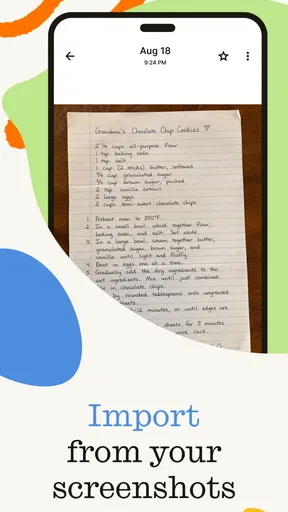
ReciMe is developed by ReciMe, and its central appeal is straightforward: when a dish catches your eye on Instagram, TikTok, Facebook, or elsewhere, you can save it for later instead of relying on your memory or trying to rediscover the post. That makes it a different starting point from a conventional recipe site, where you typically search first and choose from recipes already presented in that service’s own format.
The distinction matters if short cooking videos are a big part of how you get ideas. Social posts can be vivid and tempting, but they are not always convenient to return to when your hands are busy or you need to check what comes next. Keeping recipes in one app gives those discoveries a more practical home. I’d consider it especially useful for people who regularly send food posts to themselves or bookmark them without any reliable system for finding them again.
It is less compelling if you rarely save recipes from social media and already have a collection you like using. The best reason to install it is not simply wanting more meal ideas; it is wanting to turn online inspiration into something you can retrieve when you’re deciding what to cook.
Where a saved recipe becomes useful
A realistic use case is the end of a workday: you have a few ingredients at home, little patience for browsing, and a saved video you meant to try. Rather than scrolling through a crowded social feed, you can start with the recipes you’ve kept and make a more deliberate choice. The advantage is organizational, not magical. You still need to decide whether the dish fits your available time, appetite, and ingredients.
One practical habit I’d recommend is saving recipes with future context in mind. A recipe that looks appealing today may be hard to use later if you can’t remember why you kept it. Sorting or reviewing saved items when you have a spare moment can help separate dependable weeknight options from ambitious weekend projects. That small bit of curation is a trade-off: ReciMe can reduce the effort of finding a post again, but it cannot choose the right dish for tonight on your behalf.
If you cook with someone else, a shared recipe collection can also make planning a conversation rather than a string of links. You can bring a dish into view and discuss whether it sounds good, instead of asking the other person to search through a platform they may not use. For a household with different tastes, though, it helps to treat saved recipes as suggestions, not an agreed menu.
Worth Reading Before You Choose

Flipboard Shows What News Apps Must Do Beyond the Feed

Switching to Android Auto Means Rethinking Your Driving Routine

Google Calendar Makes a Crowded Week Easier to Manage

Ludo King Makes the Most of the Minutes Between Plans

Baby Panda World Brings Quick Play to Modern Phones, but Its Game Library Feels Busy

ESPN’s Live Game View Makes Following Close Games Easier
Making a recipe collection work in real life
I find that the real test of a recipe collection is not how many ideas it holds, but whether I can make a good choice when I’m tired, hungry, and short on time. In this section, I look at the small habits that keep saved recipes useful rather than letting them become another backlog. That practical routine also helps clarify when a different kind of cooking tool may serve you better.
A low-effort routine beats a huge backlog
It is tempting to save every appealing dish and assume you’ll sort it out later. In practice, a large pile of unreviewed recipes can become another place to procrastinate. I’d use ReciMe in two passes: save a post when you find it, then periodically look through the collection and identify the recipes you genuinely expect to cook. That quick review can reveal duplicates, dishes that require more effort than you want on a weekday, and ideas that no longer fit your plans.
This is also a useful way to judge whether the app is earning a spot on your phone. If you return to saved recipes and cook from them, the collection is doing a job. If you only accumulate posts, a social app’s built-in saves may be enough. The difference is not how many recipes you can collect; it is whether having them gathered makes your next meal decision easier.
When another kind of cooking tool fits better
Recipe discovery apps and cooking websites are often better when you want to search deliberately by cuisine, ingredient, or a particular cooking need. Social feeds, meanwhile, are convenient for spontaneous inspiration and seeing a dish in motion. ReciMe sits between those habits: it helps preserve discoveries from those feeds so you can return to them with cooking in mind. It is not a reason to stop using the sources where you find recipes.
Likewise, if your main challenge is managing a household grocery budget, tracking nutrition, or following a strict dietary plan, you should assess any recipe organizer against those particular needs rather than assume that a saved collection solves them. ReciMe’s appeal is clearest when the pain point is scattered inspiration. A specialist planning tool, a basic notes app, or a tried-and-true cookbook may be a better fit if you need a different kind of structure.
There is also a conversion cost when switching from an existing system. If your favorites already live in bookmarks, screenshots, a notebook, or another cooking app, moving them takes attention. I’d avoid trying to transfer everything at once. Start with recipes you expect to make soon, and keep the old system available while you see whether ReciMe’s way of saving and revisiting suits you. That approach limits the risk of turning a useful app into a weekend filing project.
What to expect before committing
ReciMe is free to download, with in-app purchases listed from $9.99 to $69.99 per item. I’d begin with the free experience and pay only if you find a specific paid option that solves a recurring problem for you. Those prices are a reason to make the decision based on your own routine, not on the assumption that every feature is essential. The app is rated Teen, and the current version is 3.0.2, so it is sensible to check that your device meets its minimum operating-system requirement of 12 before installing.
Its audience is already sizeable: it has over a million installs and an average rating of 4.6 from around 58,000 ratings, alongside roughly 2,200 written reviews. Those figures suggest that plenty of people find value in the idea, but they don’t tell you whether its workflow suits the way you cook. I’d treat them as useful context, then try the app against a simple test: save a recipe you genuinely want to make, find it again later, and see whether that process feels easier than your current one.
The main friction is that organizing recipes still takes a little intention. Saving solves the “where did I see that?” problem, not every question that follows: whether the instructions make sense, whether the dish fits the evening, or whether you have what it needs. Social recipes can also vary in how clearly they explain quantities and steps, so I’d review a recipe before relying on it for a time-sensitive dinner. A polished video is not always a complete cooking guide.
Getting Started with ReciMe
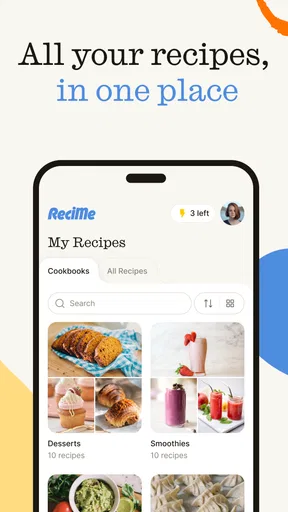
First off, downloading and setting up ReciMe was a breeze. Available on both Android and iOS, the app is designed to be user-friendly. Once you’ve got it on your phone, you’re greeted with a clean interface that’s easy to navigate. No need to be tech-savvy here; the layout is intuitive, with everything you need just a tap away.
Exploring the Recipe Universe
The heart of ReciMe lies in its extensive library of recipes. Whether you're a fan of Italian, a lover of Asian cuisine, or you’re just looking to whip up a quick dessert, there’s something for everyone. I was particularly impressed with the variety. It’s not just about quantity; the quality of these recipes shines through, too. Each one is detailed with step-by-step instructions and handy tips that even a novice cook can follow successfully.
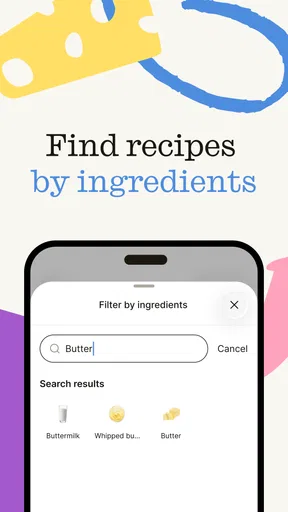
What I love most is the ability to search for recipes based on the ingredients you have at home. This feature is a game-changer for those nights when you look in the fridge and think, "What on earth am I going to make with this?"
Personalized Meal Planning
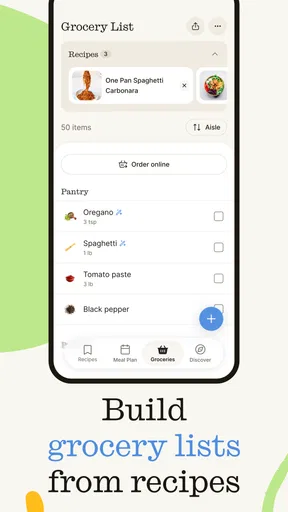
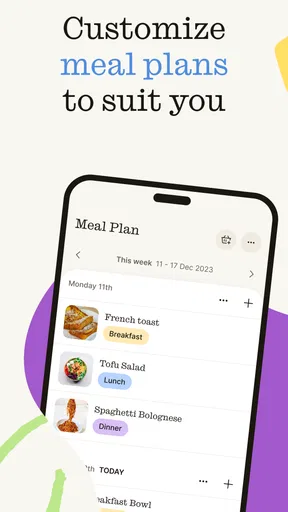
Now, let’s talk about meal planning. This app takes your culinary organization to the next level. With just a few taps, you can create a meal plan for the week. This is perfect if you're trying to eat healthier or stick to a budget. The app even generates a shopping list from your meal plan, so you’re always prepared when you hit the grocery store.
The meal planner is not only for the organized among us. If you're like me and meal planning usually involves last-minute panic, ReciMe makes it easy to plan meals without stress. It’s like having a personal assistant who is always ready to help.
Community and Sharing
Another standout feature of ReciMe is its community aspect. You can connect with other food enthusiasts, share your own recipes, and even get inspiration from others. It’s great to see people’s twists on traditional recipes or discover new dishes from different cultures. This community vibe adds a personal touch to the app, making it more than just a recipe book.
The sharing feature is simple and fun. You can upload your own creations, complete with photos and personal tips. It’s rewarding to see others try out your recipes and give feedback. It’s like being part of a global cooking club, right from your kitchen.
Final Thoughts
After using ReciMe for a couple of weeks, I can confidently say it’s a must-have for anyone who wants to spice up their cooking routine. Whether you’re a culinary wizard or someone who’s just venturing into the kitchen, this app has something to offer. Its robust features are wrapped up in an easy-to-use package that makes cooking and planning meals a joy rather than a chore.
So, if you’re ready to transform your meal times and explore a world of flavors, go ahead and give ReciMe: Recipes & Meal Planner a try. Trust me, your taste buds will thank you.
Pros
- User-friendly interface for easy navigation.
- Diverse recipe collection from global cuisines.
- Customizable meal planning features.
- Offline access to saved recipes.
- Integrated shopping list for convenience.
Cons
- Limited free features; premium required.
- Occasional app crashes reported by users.
- No video tutorials for recipe steps.
- Personalization options are minimal.
- Requires login for full functionality.
FAQs for ReciMe: Recipes & Meal Planner
What features does ReciMe: Recipes & Meal Planner offer?
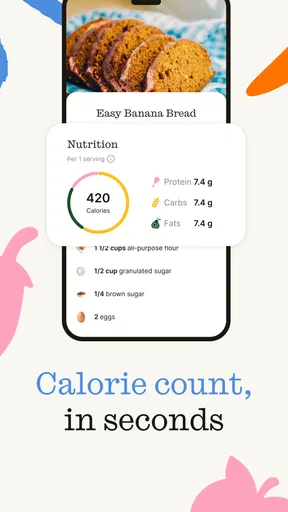
ReciMe offers a comprehensive suite of features designed to make meal planning a breeze. Users can access a vast library of recipes, create personalized meal plans, and generate automatic shopping lists. The app also includes nutritional information for each recipe, making it easier to maintain a balanced diet.
Is ReciMe: Recipes & Meal Planner suitable for people with dietary restrictions?
Yes, ReciMe caters to a variety of dietary needs. Users can filter recipes based on specific dietary preferences, such as vegetarian, vegan, gluten-free, or keto. This customization ensures everyone can find suitable meal options that align with their health goals and dietary restrictions.
Does ReciMe require an internet connection to function?
While an internet connection is required to initially download the app and access new recipes, many features of ReciMe are available offline. Users can save their favorite recipes and meal plans to access them anytime, even without an internet connection, making it convenient for on-the-go use.
Can I share recipes and meal plans with others using ReciMe?
Absolutely! ReciMe includes social sharing features that allow users to share their favorite recipes and meal plans with friends and family through social media or direct messaging. This makes it easy to exchange culinary ideas and inspire others with your culinary creations.
Is there a cost associated with using ReciMe: Recipes & Meal Planner?
ReciMe is free to download and offers a range of features at no cost. However, there are premium features available through in-app purchases, such as exclusive recipes or advanced meal planning tools. These optional purchases enhance the user experience but are not necessary to enjoy the app.


